
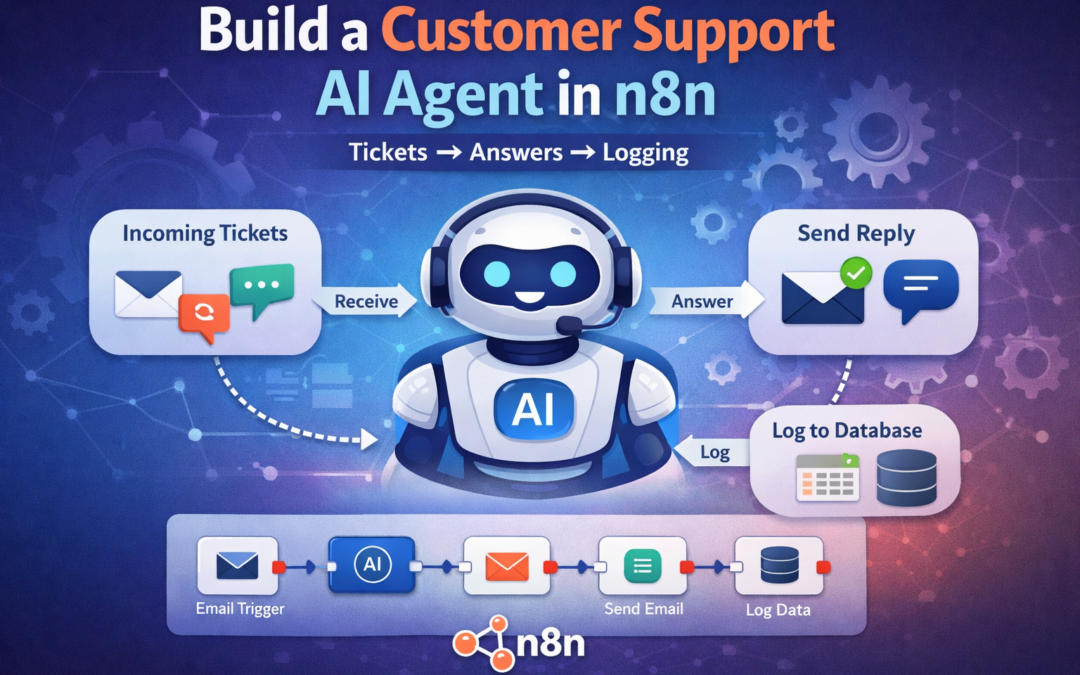
Build a Customer Support AI Agent in n8n (Tickets → Answers → Logging)
Customer support is one of the most time-consuming tasks for businesses. Many companies receive dozens or hundreds of support emails every day. Responding manually can slow down operations and increase costs.
n8n customer support AI agent
The good news is that you can automate customer support using n8n AI workflows. By combining ticket intake, AI responses, and logging systems, you can create a customer support AI agent that works 24/7.
In this guide from ReadyN8NTemplates.com, we’ll show how to build a simple yet powerful Customer Support AI Agent using n8n.
Why Use n8n for Customer Support Automation?
Using n8n automation allows businesses to:
Respond to customer inquiries instantly
Reduce support workload
Automatically log and track support tickets
Maintain consistent answers
Improve customer experience
With AI integrations, the workflow can understand questions and generate helpful responses automatically.
How the Customer Support AI Agent Works
The automation workflow generally follows this process:
Customer Ticket → AI Processing → Response → Logging
Step 1: Capture Customer Support Tickets
First, your workflow needs a way to receive customer messages.
Common input sources include:
Email inbox (Gmail / IMAP)
Website contact forms
Chat widgets
Support platforms
Slack or Telegram messages
Example:
Customer sends email:
“How can I download my purchased templates?”
The Email Trigger node in n8n captures the message.
Step 2: Send the Question to AI
Once the ticket is received, the workflow sends the message to an AI model.
This can be done using:
OpenAI node
AI Agent node
HTTP Request to an AI API
The AI analyzes the message and generates a helpful response.
Example AI prompt:
You are a helpful support assistant for ReadyN8NTemplates.com.
Answer customer questions clearly and professionally.
Example AI response:
“You can download your purchased templates from the order confirmation email or from your account dashboard.”
Step 3: Send the Reply Automatically
After the AI generates the answer, the workflow sends the response back to the customer.
This can be done using:
Gmail node
SMTP node
Slack message
Helpdesk reply
Example automated response email:
Hello,
Thank you for contacting ReadyN8NTemplates.com.
You can download your purchased templates from your account dashboard or the confirmation email you received after purchase.
If you need further assistance, feel free to reply.
Best regards
Support Team
Step 4: Log the Ticket
For tracking and analytics, every support interaction should be logged.
Common logging options include:
Google Sheets
Airtable
Notion
Database
CRM system
Example log fields:
Field Example
Ticket ID 1052
Customer Email customer@email.com
Question How to download templates
AI Response Instructions provided
Date 2026-03-09
This helps businesses analyze common support issues.
Example n8n Workflow Structure
A simple workflow may look like this:
1️⃣ Email Trigger
2️⃣ Extract Message
3️⃣ AI Processing (OpenAI / AI Agent)
4️⃣ Generate Reply
5️⃣ Send Email Response
6️⃣ Log Ticket in Google Sheets
This entire automation can run fully automatically.
Benefits of AI Customer Support Agents
Businesses using n8n AI agents can achieve:
✔ Instant responses to customers
✔ Reduced support workload
✔ Lower operational costs
✔ 24/7 support availability
✔ Better tracking of support issues
Small teams can manage hundreds of tickets automatically.
Real Use Cases
Companies are already using n8n AI agents for:
Product support
Order questions
Download instructions
Refund policies
FAQ responses
For digital product businesses like ReadyN8NTemplates.com, an AI agent can answer questions such as:
How to use n8n templates
Installation instructions
Workflow troubleshooting
Template download links
Ready-Made n8n Templates
If you want to build automation quickly, using ready-made workflows can save a lot of time.
At ReadyN8NTemplates.com, you can find 5000+ ready-to-use n8n automation templates including:
AI customer support agents
Email automation workflows
CRM integrations
Marketing automations
Slack and Telegram bots
These templates help you launch powerful automations without coding.
Final Thoughts
AI customer support agents are transforming how businesses handle customer service. With n8n automation, you can build a powerful system that automatically receives tickets, generates AI responses, and logs support interactions.
Instead of answering repetitive questions manually, your AI workflow can handle them instantly, allowing your team to focus on more important tasks.
If you want to start automating today, explore the ready-made n8n templates available on ReadyN8NTemplates.com.