
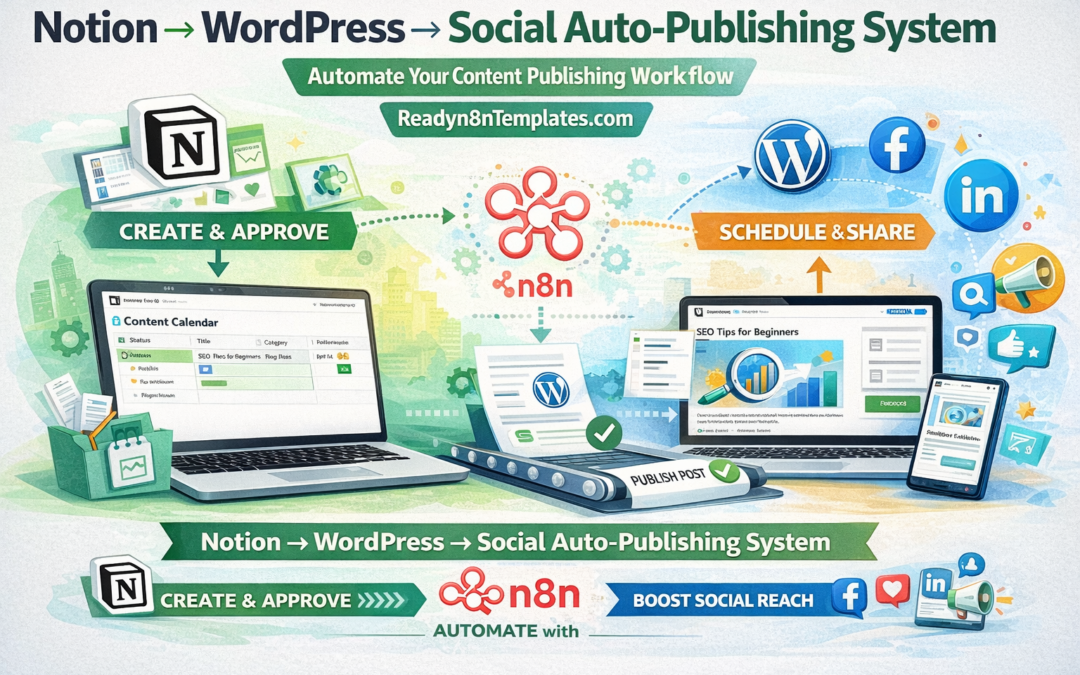
Notion → WordPress → Social Auto-Publishing System
Notion to WordPress social auto-publishing system
Content creation is easy when inspiration comes. The hard part is publishing everything on time, formatting it properly, and then promoting it across social media without repeating the same boring manual work every day. That is exactly why a Notion → WordPress → Social Auto-Publishing System is becoming one of the most useful automation setups for creators, bloggers, agencies, and digital product businesses in 2026.
If you already plan content in Notion, publish blog posts on WordPress, and share updates on social media, this workflow can save hours every week. Instead of copying titles, descriptions, images, and links from one platform to another, you can connect everything with n8n and turn your publishing process into a smooth automated system.
At Readyn8nTemplates.com, we love building practical automation workflows that reduce manual work and help businesses grow faster. This is one of those systems that feels simple once it is done, but delivers massive value every single week.
What Is a Notion → WordPress → Social Auto-Publishing System?
This system is an automated content workflow where:
you create or manage post ideas inside Notion
n8n watches for approved content
the content is automatically published to WordPress
once published, the same workflow creates social media posts
your blog link is shared automatically across selected platforms
In simple words, you manage your content in Notion once, and the workflow handles the publishing and promotion steps for you.
This is especially helpful for people who publish blog posts regularly and want a better way to stay consistent online.
Why This Automation Is Powerful in 2026
In 2026, content speed matters more than ever. Brands, bloggers, educators, affiliate marketers, and digital product sellers all need to publish faster while keeping their content quality high. But doing everything manually creates delays, mistakes, and burnout.
A Notion to WordPress automation system helps solve that problem because it keeps your process organized and repeatable. You can write, review, approve, publish, and promote content using one connected workflow.
This means:
fewer missed publishing dates
less copy-paste work
faster blog distribution
better consistency on social media
more time for writing, strategy, and business growth
For a growing website, consistency is often more important than perfection. Automation helps you stay active without feeling overwhelmed.
How the Workflow Usually Works
A typical workflow starts in Notion. You create a content database with fields such as:
post title
content body
category
slug
featured image
meta description
publishing status
social caption
publish date
Once a post is marked as approved or ready, n8n detects the change and starts the workflow.
Then the system can:
pull the content from Notion
prepare the WordPress post
upload the article to your website
set the category, tags, slug, and featured image
publish immediately or schedule it
generate social captions
post to platforms like Facebook, X, LinkedIn, or others
send a confirmation message to email, Telegram, or Slack
This turns one content entry into a complete publishing engine.
Why Notion Is a Great Starting Point
Notion works beautifully as the control center of your content pipeline. It is clean, flexible, and easy for teams or solo creators to manage. You can use it as a content calendar, blog draft board, approval system, and social media planning dashboard.
Instead of saving content ideas in random notes, docs, or chats, you can keep everything inside a structured Notion database. Once that database is connected with n8n, it becomes much more than a planning tool. It becomes the starting point of an automated publishing business system.
For content-heavy businesses, this is a huge productivity upgrade.
Why n8n Is Perfect for This Automation
n8n is one of the best tools for building flexible automation workflows because it gives you more control than many simple no-code tools. You can connect APIs, filter steps, transform text, route content, and decide exactly how your system should behave.
That means your workflow can be simple or advanced depending on your needs.
For example, with n8n you can:
publish only when the status says “Approved”
delay publishing until a selected date
rewrite captions for each social media platform
shorten links
send alerts if the WordPress publish step fails
auto-generate excerpts or hashtags
create different post types based on category
This makes n8n ideal for real business use, not just basic automation experiments.
Who Needs This System Most?
A Notion → WordPress → Social Auto-Publishing System is especially useful for:
Bloggers
Writers who want to publish articles regularly without wasting time on repetitive steps.
Digital product sellers
Businesses that promote templates, ebooks, courses, or tools and need a consistent content marketing system.
Agencies
Teams managing multiple websites and social pages for clients.
Affiliate marketers
People who publish content, reviews, and promotional articles and want to distribute them faster.
Small businesses
Companies that want a simple content workflow without hiring a large content operations team.
Personal brands
Creators who want to turn ideas into published posts and social updates from one place.
Real Business Benefits
The biggest reason people build this workflow is not because it looks smart. It is because it saves real time and creates real consistency.
Here are some of the strongest benefits:
1. Faster publishing
You no longer need to manually move content from one platform to another.
2. Better workflow management
Everything starts from one clear content dashboard in Notion.
3. Less human error
Automation reduces missing images, broken formatting, wrong links, and forgotten social posts.
4. Stronger content consistency
The more consistent you are, the more trust and traffic you can build over time.
5. Easier scaling
Once the system is ready, publishing more content does not create the same level of extra work.
Example Use Case
Imagine you run a digital products website and you publish tutorials, how-to guides, product highlights, and SEO articles every week.
Without automation, your process may look like this:
write inside Notion
copy text into WordPress
format the article
add image and slug
publish post
create a LinkedIn post
write a Facebook caption
post on other channels
notify your team manually
That may not sound huge at first, but repeated every week, it becomes a lot of wasted time.
With n8n, the workflow becomes:
write and approve in Notion
n8n publishes to WordPress
n8n creates social captions
n8n posts to selected channels
n8n sends success notification
That is a cleaner, faster, and more scalable content process.
Best Features to Add in Your Workflow
If you want this system to feel truly useful, a few extra features make a big difference.
Scheduled publishing
Let Notion control the publishing date and time so your workflow can post automatically later.
Platform-specific captions
Each social platform works differently. A LinkedIn caption should not always look like an X post.
Draft vs publish status
Some content should go live instantly, while others should stay in draft for review.
Featured image handling
Your workflow can pull a selected image URL or file and attach it to the WordPress post automatically.
Error alerts
If something breaks, the workflow should notify you instead of failing silently.
SEO fields
You can pass meta title, slug, excerpt, or description into WordPress for a more complete publishing flow.
Why This Matters for Content Marketing
Publishing a blog post is no longer enough. In 2026, content needs distribution. A good article has much more value when it is automatically shared where your audience already spends time.
That is why the “Notion to WordPress” part is only half the system. The “social auto-publishing” part is what helps turn a post into traffic, clicks, awareness, and sales opportunities.
The full system supports a modern content strategy:
create once
publish once
distribute automatically
stay consistent
grow with less manual effort
That is the kind of workflow smart businesses want now.
Why Readyn8nTemplates.com Loves This Kind of Automation
At Readyn8nTemplates.com, we focus on practical workflows that solve real business problems. A Notion → WordPress → Social Auto-Publishing System is one of the best examples of how automation can support content marketing in a simple but powerful way.
This workflow is not only for big companies. It is useful for solo creators, bloggers, startup founders, and digital businesses that want more results from the same amount of effort.
When your content workflow is organized, automated, and repeatable, growth becomes easier to manage.
Final Thoughts
A Notion → WordPress → Social Auto-Publishing System is one of the smartest n8n workflows to build in 2026. It helps you move from idea to published content faster, reduces repetitive work, and keeps your brand active across both your website and social media.