
AI Email Assistant with n8n: Automatically Write Email Replies from Gmail Drafts
Introduction
AI email assistant n8n
Managing emails can take a lot of time, especially for businesses that receive dozens or hundreds of messages every day. Customer inquiries, support requests, partnership emails, and follow-ups often require thoughtful responses.
With n8n automation, you can build an AI Email Assistant that automatically reads incoming emails, generates intelligent replies using AI, and saves the response as a Gmail draft ready for review and sending.
This automation helps businesses save time, improve response speed, and maintain professional communication without manually writing every email.
In this guide, we will show how to create an AI-powered Gmail reply assistant using n8n.
What is an AI Email Assistant in n8n?
An AI Email Assistant is an automation workflow that:
Detects new incoming emails in Gmail
Sends the email content to an AI model
Generates a professional reply
Saves the reply as a Gmail draft
Allows the user to review and send
This means you never start from a blank email again — the AI writes the reply for you.
Why Use n8n for Email Automation?
n8n is one of the most powerful workflow automation platforms that allows you to connect different services like Gmail, AI APIs, databases, CRMs, and messaging tools.
Benefits of using n8n for email automation:
1. Save Time on Repetitive Emails
Businesses often send similar responses repeatedly. AI can generate replies instantly.
2. Improve Customer Support
Quick replies improve customer satisfaction and response time.
3. No Coding Required
n8n workflows are built visually, making automation accessible to everyone.
4. Customizable Workflows
You can customize responses based on keywords, customers, or email categories.
5. Scale Your Business Communication
Handle hundreds of emails daily without increasing staff.
Example Workflow: AI Gmail Reply Automation
Here is a simple workflow structure.
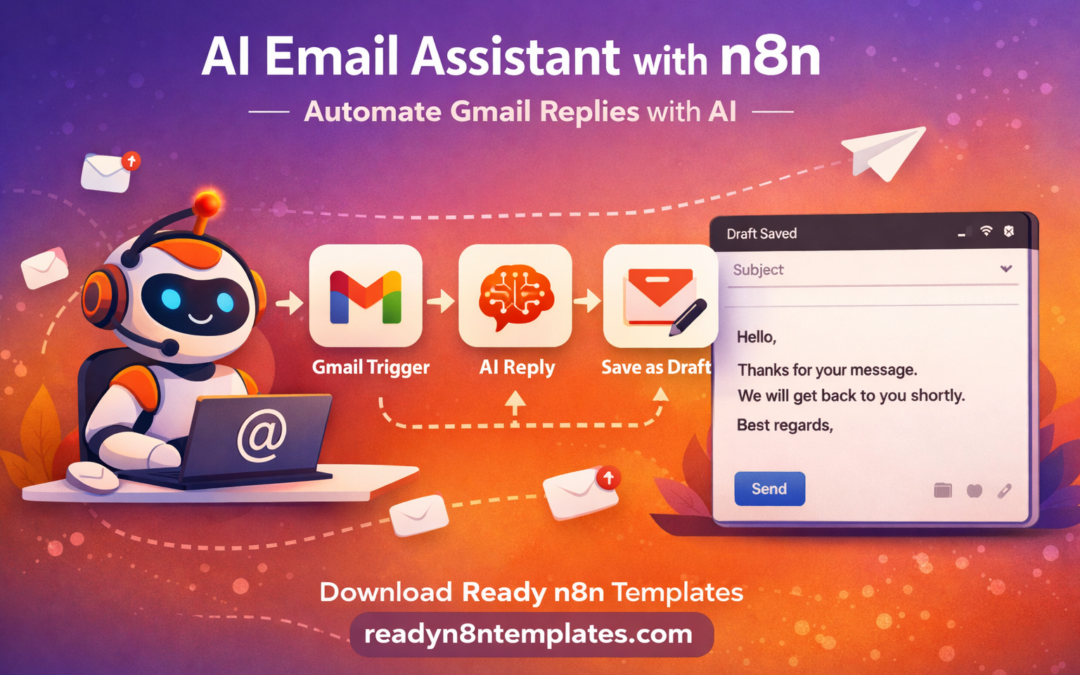
Step 1: Gmail Trigger
The workflow starts when a new email arrives in Gmail.
Node:
Gmail Trigger
The node detects incoming messages and extracts:
Sender email
Subject
Email content
Date and metadata
Step 2: Process Email Content
Next, we clean or structure the email content before sending it to AI.
Example:
Extract the main message body and remove unnecessary formatting.
Node:
Set / Function node
Step 3: Send Email to AI for Reply Generation
Now the email content is sent to an AI model (OpenAI or similar).
Example AI prompt:
“Write a professional reply to this email. Keep it polite and helpful.”
The AI will generate a response such as:
customer support answer
follow-up message
meeting reply
order support response
Node:
OpenAI Node
Step 4: Generate Email Reply
The AI response will look like a professionally written email reply.
Example output:
Hello,
Thank you for contacting us. We appreciate your message and will review your request. Our team will get back to you shortly with more details.
Best regards.
Step 5: Save Reply as Gmail Draft
Instead of sending automatically, the workflow saves the response as a Gmail draft.
Node:
Gmail → Create Draft
This allows the user to:
✔ Review the response
✔ Edit if necessary
✔ Send manually
Real Business Use Cases
This automation is extremely useful for many industries.
Customer Support
Automatically generate replies to customer inquiries.
Sales Teams
Respond quickly to lead emails and partnership requests.
Freelancers
Reply to client messages faster.
Agencies
Manage hundreds of emails efficiently.
E-commerce Businesses
Handle order questions and product inquiries.
Example AI Email Prompt
You can improve AI responses with a structured prompt.
Example:
Write a professional email reply.
Email content:
{{email_text}}
Rules:
be polite
be concise
offer help
include greeting and closing
This produces more consistent responses.
Advanced Improvements
You can make the automation even smarter.
Smart Email Categorization
AI can detect if the email is:
support request
refund request
partnership email
marketing inquiry
CRM Integration
Send email data to CRM systems like:
HubSpot
Airtable
Notion
Google Sheets
Slack Notifications
Notify your team when important emails arrive.
Customer History Lookup
Retrieve customer data before generating replies.
Download Ready n8n Email Automation Templates
If you want to build automation faster, you can use ready-made n8n workflow templates.
On our website you can download 1500+ ready-to-use n8n automation workflows for business, marketing, AI, and productivity.
These workflows help you automate:
email marketing
lead generation
customer support
social media posting
business automation
Visit:https://readyn8ntemplates.com
Start your automation journey without coding.
Final Thoughts
AI email assistants are transforming how businesses manage communication. Instead of spending hours replying to emails, automation can generate professional responses instantly.
Using n8n + Gmail + AI, you can create powerful email workflows that save time, improve productivity, and help businesses scale communication efficiently.