
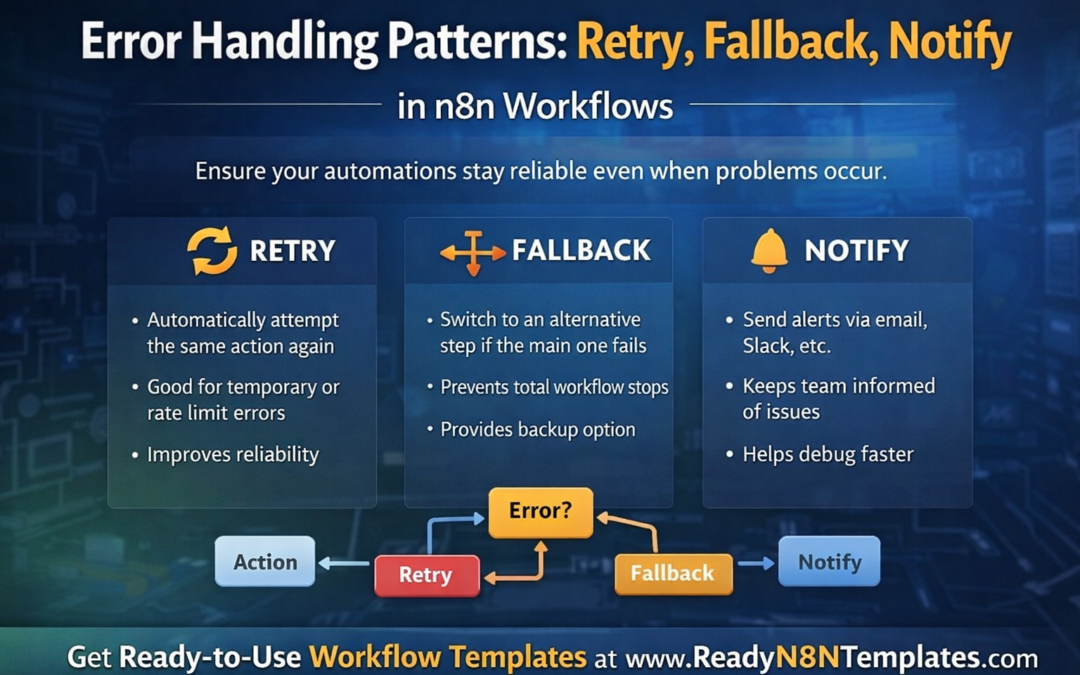
Error Handling Patterns: Retry, Fallback, Notify
Error Handling Patterns in n8n
Automation saves time, but even the best workflow can fail sometimes. APIs go down, rate limits get hit, data arrives in the wrong format, or a third-party service suddenly stops responding. That is why smart automation is not only about making workflows run — it is about making them recover when something goes wrong. In n8n, strong error handling can make the difference between a workflow that breaks and a workflow that keeps your business moving.
At ReadyN8NTemplates.com, we believe that real automation should be reliable, practical, and ready for real-world problems. One of the most important skills in n8n is learning how to use retry, fallback, and notify patterns to protect your workflows.
Why Error Handling Matters in n8n
Many beginners focus only on the happy path. They connect a trigger, add a few nodes, and see the workflow run successfully once. However, in real business use, failures happen often. A webhook may time out. An AI response may return incomplete data. An email service may reject a request. A CRM update may fail because of missing fields.
Without error handling, one small issue can stop the entire process. With the right strategy, your workflow can try again, switch to an alternative step, and alert you immediately.
That is why error handling is one of the most valuable n8n best practices for businesses, freelancers, agencies, and automation developers.
Pattern 1: Retry
The retry pattern is used when an error is temporary. Sometimes the service is available again after a few seconds or minutes. Instead of failing immediately, the workflow tries the same action again.
This pattern is useful for:
API rate limit errors
Temporary network issues
Short service outages
Delayed database responses
Webhook delivery failures
For example, if your n8n workflow sends data to Google Sheets and the request fails because of a temporary connection issue, a retry step can attempt the same request again before marking the workflow as failed.
Benefits of Retry
Reduces unnecessary workflow failures
Handles temporary service issues automatically
Saves manual troubleshooting time
Improves workflow reliability
A retry strategy works best when you set a reasonable delay between attempts. Too many retries in a short time can create more problems, especially with rate-limited services.
Pattern 2: Fallback
The fallback pattern is used when the main step fails and you want the workflow to continue using another option. Instead of stopping the whole process, n8n moves to a backup path.
This pattern is very helpful when your business depends on continuity.
Examples of fallback include:
If OpenAI fails, use another AI model or backup service
If Gmail sending fails, save the message to a spreadsheet for later review
If a CRM update fails, store the lead in Airtable or Google Sheets
If the main webhook response fails, send a default response to the user
Fallback keeps your workflow useful even when the ideal path is not available.
Benefits of Fallback
Prevents total workflow failure
Keeps business operations moving
Protects leads, orders, or customer data
Gives you a backup solution instantly
A good fallback design can protect sales, customer messages, and important business records from being lost.
Pattern 3: Notify
The notify pattern is simple but powerful. When something goes wrong, the workflow sends an alert so you know what happened. This can be done through email, Slack, Telegram, Discord, or another notification tool.
A notification should tell you:
Which workflow failed
Which step caused the error
What time it happened
What data was being processed
Whether retry or fallback already happened
This gives you quick visibility and helps you solve the issue faster.
Benefits of Notify
Helps you react quickly
Makes debugging easier
Improves team awareness
Prevents silent failures
Many businesses lose opportunities because workflows fail silently. Notifications help you stay informed before a small issue becomes a bigger problem.
The Best Approach: Use All Three Together
The strongest n8n workflows often use retry, fallback, and notify together.
A smart workflow may look like this:
Try the main action
If it fails, retry a few times
If it still fails, move to a fallback step
Send a notification with error details
This creates a more professional and dependable automation system. Instead of depending on luck, your workflow becomes prepared for real-world conditions.
Real Example in n8n
Imagine you are running an online business and using n8n to process new leads:
A form submission enters the workflow
The lead is sent to your CRM
A welcome email is sent
A Slack message is posted to your team
Now imagine the CRM API fails.
With good error handling:
n8n retries the CRM request
If the retry still fails, the lead is saved to Google Sheets as a fallback
You receive a Slack or email notification about the failure
This means the lead is not lost, your team stays informed, and the workflow remains useful.
Why This Matters for Business Automation
Reliable automation is not only about speed. It is about trust. If your workflows handle errors properly, you can use n8n with more confidence for sales, customer support, lead capture, reporting, AI tasks, and daily operations.
This is especially important for:
Small businesses
Agencies
Marketing teams
E-commerce stores
SaaS founders
Freelancers managing client automations
When your workflows are built with recovery in mind, you reduce risk and improve results.
Get Ready-to-Use n8n Templates
At www.ReadyN8NTemplates.com
, we provide ready-to-use n8n workflow templates designed for real business needs. Our templates help you save time, reduce setup work, and build smarter automations faster. Whether you are creating email automation, AI workflows, lead management systems, or sales processes, strong error handling should always be part of the design.
Final Thoughts
Retry, fallback, and notify are three essential error handling patterns in n8n. They help your workflows stay reliable, protect important data, and keep your automation running even when problems happen. If you want to build professional automations, do not only focus on what happens when everything works. Build for the moments when something fails.