
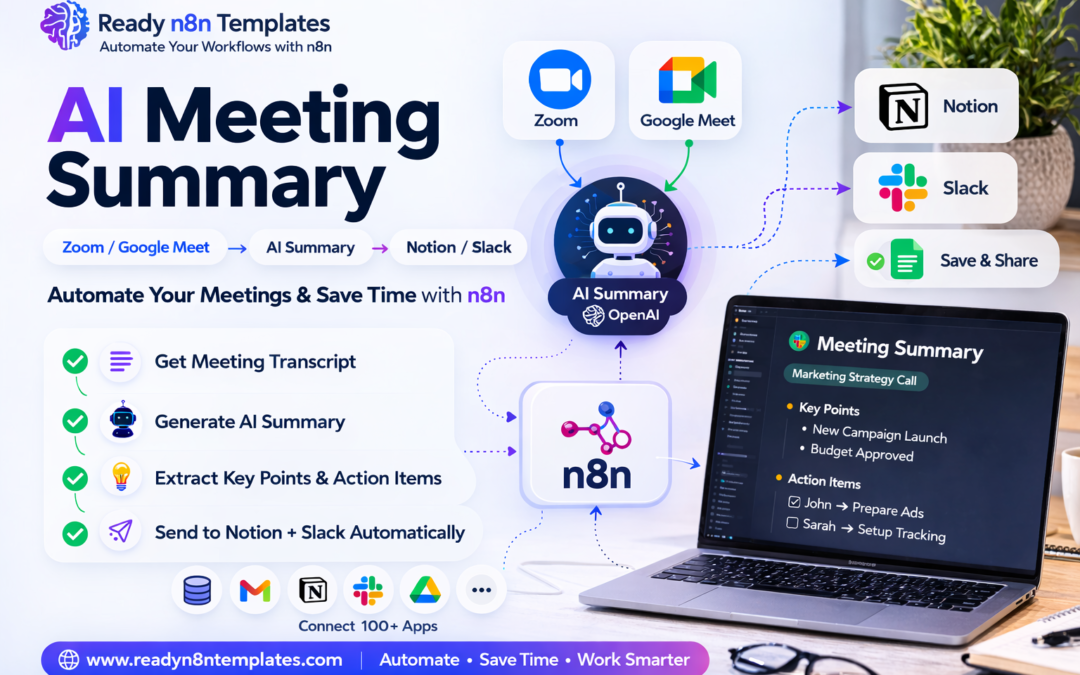
AI Meeting Summary Workflow: Zoom / Google Meet → AI Summary → Notion or Slack (Using n8n)
Modern businesses attend dozens of online meetings every week. Whether it is a team meeting, client discussion, marketing call, or project review, meetings often generate important information and action items.
Targets n8n automation users
But the biggest problem is this:
❌ People forget key points
❌ Notes are incomplete
❌ Action items are missed
❌ Meeting details are scattered across emails and chats
This is where AI automation with n8n becomes extremely powerful.
Using n8n workflow automation, you can automatically convert your Zoom or Google Meet meetings into clear AI-generated summaries, then send those summaries directly to Notion, Slack, or other productivity tools.
This workflow saves time, improves productivity, and ensures that no important discussion is ever lost.
At www.readyn8ntemplates.com
, we provide ready-to-use n8n workflow templates that allow businesses to implement this automation without complex coding.
Why Automate Meeting Summaries?
Manual note-taking during meetings is inefficient and unreliable.
Automation with AI + n8n workflows solves this problem by creating automatic meeting documentation.
Benefits include:
✔ Automatic meeting summaries
✔ Clear action items generated by AI
✔ Team collaboration improvements
✔ Faster decision making
✔ Centralized meeting records
Instead of writing notes manually, your AI workflow does the work for you.
How the AI Meeting Summary Workflow Works
The automation process is simple but powerful.
Step 1 – Meeting Recording
The workflow starts when a meeting occurs on:
• Zoom
• Google Meet
• Microsoft Teams
The meeting recording or transcript becomes the input data for the automation.
Step 2 – n8n Receives the Meeting Data
Using integrations and APIs, n8n automatically receives the meeting transcript or recording file.
This may come from:
• Zoom cloud recording
• Google Meet transcript tools
• Email notifications
• File uploads
• Meeting notes
Once the data is received, the workflow triggers the AI processing stage.
Step 3 – AI Generates the Summary
n8n connects with an AI model (such as OpenAI or other AI services) to process the meeting transcript.
The AI then generates:
✔ Meeting summary
✔ Key discussion points
✔ Important decisions
✔ Action items
✔ Follow-up tasks
Instead of reading a long transcript, you receive a short, clear summary within seconds.
Step 4 – Send Summary to Notion
The workflow can automatically save the summary into Notion workspace.
This allows teams to create a centralized knowledge base of meetings.
Example Notion entry:
Meeting Title
Date
Participants
Summary
Key Points
Action Items
Over time, this builds a powerful searchable meeting database for your organization.
Step 5 – Send Summary to Slack
The same workflow can also send the summary directly to Slack channels.
Example message:
📌 Meeting Summary
Project: Marketing Strategy Call
Key Points
• New campaign launching next month
• Budget approved for ads
Action Items
• John: Prepare ad creatives
• Sarah: Setup campaign tracking
Now every team member instantly receives the important highlights of the meeting.
Example Workflow Structure in n8n
Typical workflow nodes include:
1️⃣ Zoom Trigger / Webhook
2️⃣ Get Meeting Transcript
3️⃣ AI Processing (OpenAI Node)
4️⃣ Format Summary
5️⃣ Send to Notion
6️⃣ Send to Slack
This entire automation runs without manual work.
Who Should Use This Automation?
This workflow is ideal for many professionals and organizations.
Business Teams
Automatically document internal meetings.
Remote Teams
Ensure everyone stays updated across different time zones.
Project Managers
Track tasks and meeting decisions easily.
Marketing Teams
Save campaign meeting summaries automatically.
Startup Founders
Reduce administrative work and focus on strategy.
Why Use n8n for Meeting Automation?
n8n is one of the most powerful workflow automation platforms available today.
Key advantages:
✔ Open-source automation platform
✔ Connects with hundreds of apps
✔ Supports AI integrations
✔ Highly customizable workflows
✔ Self-hosted or cloud options
With n8n, businesses can create powerful AI-powered automations without expensive software subscriptions.
Ready-to-Use n8n Templates
Building workflows from scratch can take time.
That’s why www.readyn8ntemplates.com
offers ready-made automation templates.
Our library includes:
✔ AI automation workflows
✔ Marketing automation
✔ Email automation
✔ Lead generation workflows
✔ Data processing automations
✔ Customer support automations
✔ Meeting summary workflows
You can simply import the workflow and start automating your work immediately.
Final Thoughts
AI-powered meeting summaries are becoming a must-have productivity tool for modern businesses.
By combining Zoom, Google Meet, AI, Notion, Slack, and n8n, you can build a fully automated system that captures every important meeting detail.
Instead of wasting time writing notes, your team can focus on ideas, strategy, and execution.
If you want to start automating your workflows today, explore the ready templates available at:
Start building smarter workflows and let automation handle the repetitive tasks.